 Imagelio
Images, ready for your next step.
Imagelio brings image preparation, metadata control, library review and text recognition into one workspace for iPhone, iPad and Mac. Work on a new copy and check the result before sharing.
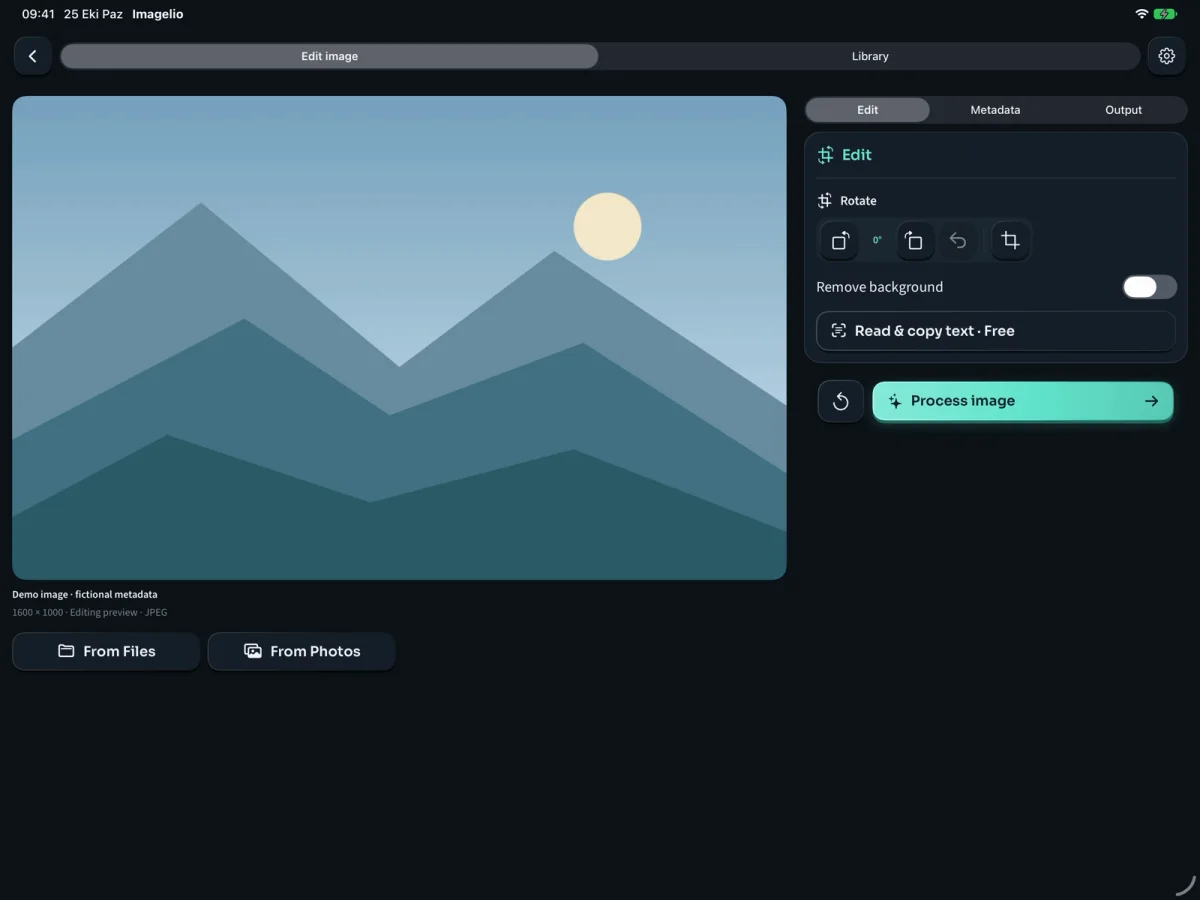

Illustrative text recognition
Example imagery, not a live processing result.
Compatibility
Mac requires Apple silicon (M1 or later) and macOS 14 or later. Intel Macs are not supported. iPhone and iPad require iOS/iPadOS 17 or later. Supported formats, background separation and OCR depend on the device and operating system.
Image tools
Convert JPEG, PNG, TIFF, BMP, WebP and still GIF, with AVIF output on supported systems. Rotate, crop, resize, adjust quality, target a file size, and remove backgrounds from suitable images. Enlargement up to 2× uses interpolation; it does not reconstruct missing detail with AI. Profiles save settings, and advanced naming keeps batch outputs organized.
Review your library
Scan a selected folder for identical file contents, review images side by side and inspect text-area candidates. Quality suggestions are review aids, not a guarantee of the best photo. Copy, Move and system Trash apply only to folder files you review and select. Move verifies a destination copy before attempting to trash an unchanged source. There is no permanent-delete fallback. Photos-library scanning is read-only; Imagelio does not delete Photos assets or scan the entire phone.
Read and export text
Recognize text on the device, correct it and copy it for free. Pro saves TXT, RTF or selectable-text PDF; a batch creates a separate text file for each image. Recognition may miss small, blurred, handwritten or unsupported text. Always check important information.
Free tools and Pro
Single-image preparation, text copying, library scanning and single-file folder organization are free. Pro covers batch image preparation, advanced batch naming, multi-file folder organization and text-file export. Monthly and yearly subscriptions unlock the same Pro tools. No weekly or per-tool plan; no new lifetime purchase.
Limits and accuracy
Up to 1,000 images per batch, with individual inputs limited to 40 MB and 50 megapixels. Batch import uses temporary device storage. Keep enough free space for the selected originals and new outputs. Folder/library scanning has technical limits and can report skipped or inaccessible items. A file-size target is not guaranteed for every image or format. Keep backups and inspect outputs. Sending files to Trash does not prove space has been freed.
ImagelioGörsellerin bir sonraki adıma hazır.
Imagelio; görsel hazırlama, meta veri kontrolü, arşiv inceleme ve metin tanımayı iPhone, iPad ve Mac için tek çalışma alanında birleştirir. Yeni bir kopya üzerinde çalış, paylaşmadan önce sonucu kontrol et.
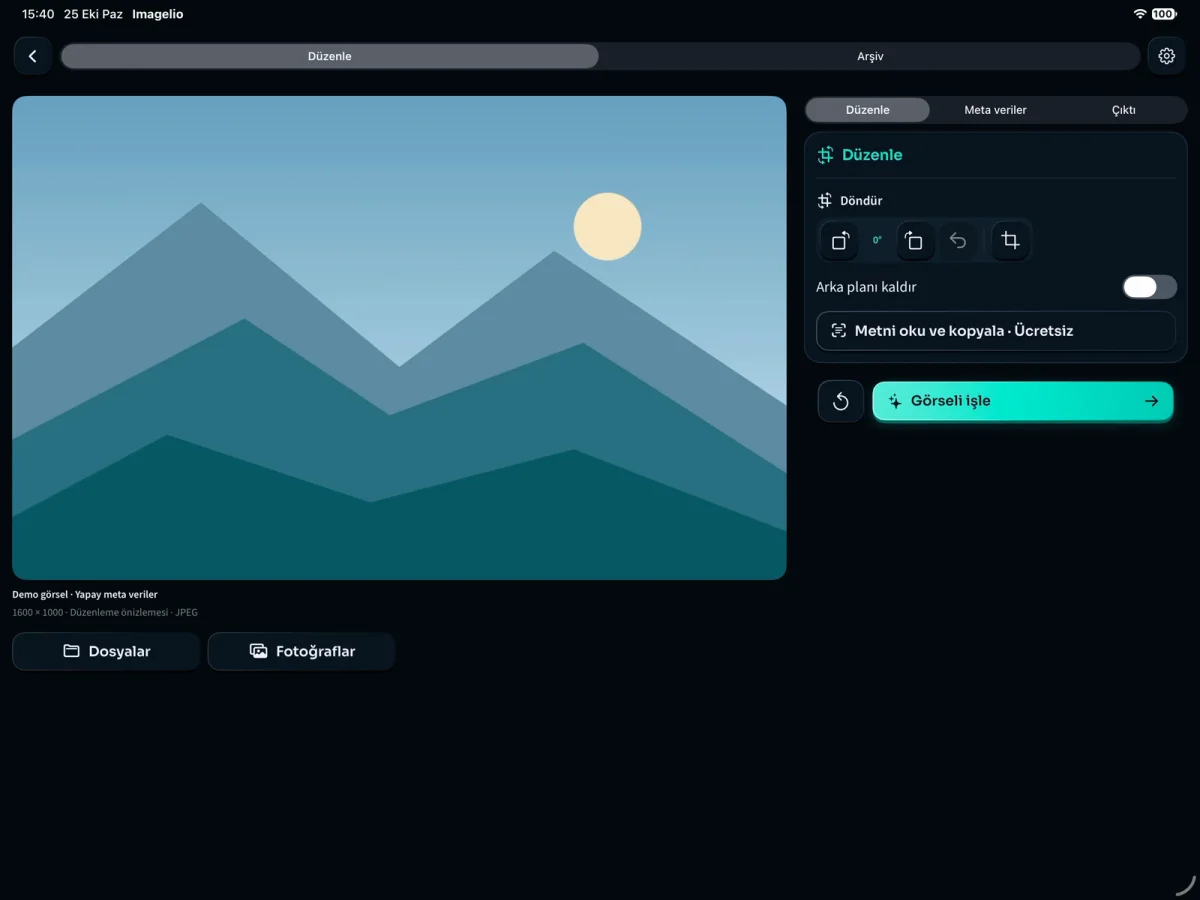
Illustrative text recognition
Örnek görsel; gerçek bir işlem sonucu değildir.
Uyumluluk
Mac için Apple Silicon (M1 veya üstü) ve macOS 14 veya üstü gerekir. Intel Mac desteklenmez. iPhone ve iPad için iOS/iPadOS 17 veya üstü gerekir. Biçim desteği, arka plan ayırma ve OCR cihaz ile işletim sistemine bağlıdır.
Görsel araçları
JPEG, PNG, TIFF, BMP, WebP ve durağan GIF arasında dönüştür; desteklenen sistemlerde AVIF çıktısı al. Döndür, kırp, boyutlandır, kaliteyi ayarla, dosya boyutu hedefi belirle ve uygun görsellerde arka planı kaldır. En fazla 2× büyütme enterpolasyon kullanır; eksik ayrıntıyı yapay zekâyla yeniden üretmez. Profiller ayarlarını saklar, gelişmiş adlandırma toplu çıktıları düzenler.
Arşivini incele
Seçtiğin klasörde dosya içeriği aynı görselleri tara; görselleri yan yana, metin alanı adaylarını ayrı incele. Kalite önerileri incelemeye yardımcıdır, en iyi fotoğraf garantisi değildir. Kopyala, Taşı ve sistem Çöp Kutusu yalnız inceleyip seçtiğin klasör dosyalarına uygulanır. Taşıma, değişmemiş kaynağı çöpe göndermeden önce hedef kopyayı doğrular. Kalıcı silme alternatifi kullanılmaz. Fotoğraflar arşivi taraması salt okunurdur; Imagelio Fotoğraflar öğelerini silmez, telefonun tamamını taramaz.
Metni oku ve dosyaya aktar
Metni cihazda tanı, düzelt ve ücretsiz kopyala. Pro ile TXT, RTF veya seçilebilir metin içeren PDF kaydet; toplu aktarımda her görsel için ayrı metin dosyası oluşturulur. Küçük, bulanık, el yazısı veya desteklenmeyen metinler eksik tanınabilir. Önemli bilgileri mutlaka kontrol et.
Ücretsiz araçlar ve Pro
Tekli görsel hazırlama, metin kopyalama, arşiv taraması ve tek dosyalı klasör düzenleme ücretsizdir. Pro; toplu görsel hazırlama, gelişmiş toplu adlandırma, çoklu klasör düzenleme ve metin dosyası aktarımını kapsar. Aylık ve yıllık abonelik aynı Pro araçlarını açar. Haftalık veya araç başına plan, yeni kalıcı satın alma yoktur.
Sınırlar ve doğruluk
Bir toplu işlemde en fazla 1.000 görsel; tek girdide en fazla 40 MB ve 50 megapiksel desteklenir. Toplu içe alma cihazda geçici depolama alanı kullanır. Seçilen kaynaklar ve yeni çıktılar için yeterli boş alan bırak. Klasör/arşiv taraması teknik sınırlar nedeniyle atlanan veya erişilemeyen öğeleri bildirebilir. Her görsel ve biçimde dosya boyutu hedefine ulaşılacağı garanti edilmez. Yedek tut, çıktıları incele. Dosyayı çöpe göndermek alanın boşaldığını kanıtlamaz.
ImagelioBilder, bereit für den nächsten Schritt.
Imagelio verbindet Bildvorbereitung, Metadatenkontrolle, Mediathekprüfung und Texterkennung in einem Arbeitsbereich für iPhone, iPad und Mac. Bearbeite eine neue Kopie und prüfe das Ergebnis vor dem Teilen.
Illustrative text recognition
Beispielbild, kein aktuelles Verarbeitungsergebnis.
Kompatibilität
Für Mac sind Apple silicon (M1 oder neuer) und macOS 14 oder neuer erforderlich. Intel-Macs werden nicht unterstützt. iPhone und iPad benötigen iOS/iPadOS 17 oder neuer. Formatunterstützung, Hintergrundentfernung und OCR hängen von Gerät und Betriebssystem ab.
Bildwerkzeuge
Konvertiere JPEG, PNG, TIFF, BMP, WebP und unbewegtes GIF; AVIF-Ausgabe ist auf unterstützten Systemen möglich. Drehe, beschneide und skaliere Bilder, passe die Qualität an, lege eine Ziel-Dateigröße fest und entferne geeignete Hintergründe. Die bis zu 2-fache Vergrößerung nutzt Interpolation, keine KI-Rekonstruktion fehlender Details. Profile speichern Einstellungen; erweiterte Dateinamen halten Stapelausgaben übersichtlich.
Mediathek prüfen
Scanne einen ausgewählten Ordner auf identische Dateiinhalte, vergleiche Bilder nebeneinander und prüfe Kandidaten anhand ihres Textanteils. Qualitätsvorschläge helfen bei der Prüfung, garantieren aber nicht das beste Foto. Kopieren, Verschieben und Systempapierkorb betreffen nur geprüfte, ausgewählte Ordnerdateien. Vor dem Verschieben wird die Zielkopie überprüft, erst danach die unveränderte Quelle in den Papierkorb gelegt. Bei Fehlern erfolgt keine endgültige Löschung. Das Scannen der Fotomediathek ist schreibgeschützt: Imagelio löscht keine Fotos-Objekte und durchsucht nicht das gesamte Telefon.
Text erkennen und exportieren
Erkenne Text auf dem Gerät, korrigiere und kopiere ihn kostenlos. Mit Pro speicherst du TXT, RTF oder PDF mit auswählbarem Text; beim Stapelexport entsteht pro Bild eine Datei. Kleine, unscharfe, handschriftliche oder nicht unterstützte Texte können fehlen. Prüfe wichtige Angaben immer.
Kostenlose Werkzeuge und Pro
Einzelbildvorbereitung, Textkopieren, Mediathek-Scans und das Organisieren einzelner Ordnerdateien sind kostenlos. Pro umfasst Stapelverarbeitung, erweiterte Stapelbenennung, Ordneraktionen für mehrere Dateien und Textdateiexport. Monats- und Jahresabo bieten dieselben Pro-Werkzeuge. Es gibt weder Wochenabos noch Einzelwerkzeugkäufe oder neue lebenslange Käufe.
Grenzen und Genauigkeit
Maximal 1.000 Bilder pro Stapel, je Eingabe höchstens 40 MB und 50 Megapixel. Der Stapelimport nutzt temporären Gerätespeicher. Halte genügend freien Speicher für die ausgewählten Originale und neuen Ausgaben bereit. Technische Scangrenzen können zu übersprungenen oder unzugänglichen Objekten führen. Die Ziel-Dateigröße ist nicht für jedes Bild und Format erreichbar. Halte Sicherungen vor und prüfe Ausgaben. Papierkorb bedeutet nicht, dass Speicher freigegeben wurde.
ImagelioИзображения готовы к следующему шагу.
Imagelio объединяет подготовку изображений, управление метаданными, проверку архива и распознавание текста на iPhone, iPad и Mac. Работайте с новой копией и проверяйте результат перед отправкой.
Illustrative text recognition
Пример изображения, а не результат текущей обработки.
Совместимость
Для Mac требуются чип Apple silicon (M1 или новее) и macOS 14 или новее. Mac с Intel не поддерживаются. Для iPhone и iPad нужны iOS/iPadOS 17 или новее. Форматы, отделение фона и OCR зависят от устройства и системы.
Инструменты для изображений
Преобразуйте JPEG, PNG, TIFF, BMP, WebP и статические GIF; экспорт AVIF доступен в поддерживаемых системах. Поворачивайте, обрезайте, меняйте размеры и качество, задавайте целевой размер файла и удаляйте фон на подходящих изображениях. Увеличение до 2× использует интерполяцию, а не ИИ-восстановление деталей. Профили сохраняют настройки, расширенные шаблоны упорядочивают имена пакетных файлов.
Проверка архива
Ищите в выбранной папке файлы с одинаковым содержимым, сравнивайте изображения и проверяйте кандидатов по доле текста. Подсказки качества помогают проверке, но не гарантируют выбор лучшего фото. Копирование, перемещение и системная корзина применяются только к проверенным и выбранным файлам папки. Перед отправкой неизменённого исходника в корзину проверяется копия в назначении. При ошибке постоянное удаление не используется. Сканирование медиатеки «Фото» доступно только для чтения: Imagelio не удаляет её объекты и не сканирует весь телефон.
Распознавание и экспорт текста
Распознавайте текст на устройстве, исправляйте и копируйте его бесплатно. Pro сохраняет TXT, RTF и PDF с выделяемым текстом; пакетный экспорт создаёт файл для каждого изображения. Мелкий, размытый, рукописный или неподдерживаемый текст может распознаться не полностью. Проверяйте важные сведения.
Бесплатные функции и Pro
Подготовка одного изображения, копирование текста, сканирование архива и работа с одним файлом папки бесплатны. Pro включает пакетную обработку и именование изображений, действия с несколькими файлами папки и экспорт текста в файлы. Месячная и годовая подписки открывают одинаковые инструменты. Недельных подписок, оплаты отдельных инструментов и новых бессрочных покупок нет.
Ограничения и точность
До 1 000 изображений в пакете, до 40 МБ и 50 мегапикселей на изображение. Пакетный импорт использует временное место на устройстве. Оставьте достаточно свободного места для выбранных оригиналов и новых файлов. Технические ограничения сканера могут приводить к пропускам и недоступным объектам. Целевой размер файла достижим не для любого изображения и формата. Делайте резервные копии и проверяйте результат. Корзина не означает освобождение места.
Imagelio画像を、次のステップへ。
Imagelioは、画像の準備、メタデータ管理、ライブラリの確認、テキスト認識をiPhone、iPad、Macのひとつの作業画面にまとめます。新しいコピーを作成し、共有する前に結果を確認できます。
Illustrative text recognition
説明用の画像です。実際の処理結果ではありません。
動作環境
MacにはApple silicon(M1以降)とmacOS 14以降が必要です。Intel Macには対応していません。iPhoneとiPadにはiOS/iPadOS 17以降が必要です。対応形式、背景分離、OCRはデバイスとOSによって異なります。
画像ツール
JPEG、PNG、TIFF、BMP、WebP、静止GIFを変換できます。対応システムではAVIFも出力できます。回転、切り抜き、サイズや画質の調整、ファイル容量の指定、適した画像の背景除去に対応します。最大2倍の拡大は補間によるもので、AIで失われた細部を復元する機能ではありません。設定はプロファイルに保存でき、一括出力には詳細な命名設定を使えます。
ライブラリの確認
選択したフォルダで内容が同一のファイルを探し、画像を並べて比較したり、テキスト面積による候補を確認したりできます。画質の提案は確認の補助であり、最良の写真を保証しません。コピー、移動、システムのゴミ箱への移動は、確認して選んだフォルダ内のファイルだけが対象です。移動では保存先のコピーを検証してから、変更されていない元ファイルをゴミ箱へ移します。失敗時に完全削除へ切り替えることはありません。「写真」ライブラリのスキャンは読み取り専用で、写真の項目を削除したり、端末全体をスキャンしたりしません。
テキストの認識と書き出し
デバイス内でテキストを認識し、修正やコピーを無料で行えます。ProではTXT、RTF、選択可能なテキストを含むPDFに保存でき、一括書き出しでは画像ごとに別のファイルを作成します。小さい文字、ぼやけた文字、手書き、非対応の文字は認識できない場合があります。重要な内容は必ず確認してください。
無料機能とPro
画像1枚の処理、テキストのコピー、ライブラリのスキャン、フォルダ内のファイル1件の整理は無料です。Proは画像の一括処理、詳細な一括命名、フォルダ内の複数ファイルの整理、テキストファイルの書き出しを含みます。月額と年額で利用できるProツールは同じです。週額プランやツール別の課金、新規の買い切り販売はありません。
制限と精度
一括処理は最大1,000枚、各入力は40 MB・5,000万画素までです。一括インポートには端末の一時保存領域を使用します。選択した元画像と新しい出力を保存できる空き容量を確保してください。スキャンの技術的制限により、項目が除外・アクセス不能と報告されることがあります。すべての画像・形式で指定容量を満たせるとは限りません。バックアップを保ち、出力を確認してください。ゴミ箱への移動は空き容量の増加を保証しません。
Imagelio让图片准备好,迎接下一步。
Imagelio 为 iPhone、iPad 和 Mac 提供统一的图片处理、元数据管理、图库检查与文本识别工作区。创建新副本,并在分享前检查结果。
Illustrative text recognition
演示图片,并非实时处理结果。
兼容性
Mac 需要 Apple 芯片(M1 或更新型号)及 macOS 14 或更高版本,不支持 Intel Mac。iPhone 和 iPad 需要 iOS/iPadOS 17 或更高版本。格式支持、背景分离与 OCR 功能取决于设备及系统。
图片工具
可转换 JPEG、PNG、TIFF、BMP、WebP 和静态 GIF,受支持的系统还可输出 AVIF。可旋转、裁剪、调整尺寸与质量、设置目标文件大小,并为合适的图片移除背景。最高 2 倍放大采用插值,不会通过 AI 重建缺失细节。配置预设可保存设置,高级命名可整理批量输出文件。
检查图库
扫描所选文件夹中的相同文件内容,并排比较图片,或检查按文字面积筛出的候选图片。质量建议仅供检查参考,不保证选出最佳照片。复制、移动及移至系统废纸篓仅针对你检查并选中的文件夹文件。移动前会验证目标副本,再尝试将未改变的源文件移至废纸篓;失败时不会改为永久删除。照片图库扫描为只读,Imagelio 不会删除“照片”中的项目,也不会扫描整部手机。
识别并导出文本
在设备上识别文本,免费修改并复制。Pro 可保存 TXT、RTF 或包含可选择文本的 PDF;批量导出为每张图片生成单独文件。小字、模糊文字、手写字及不受支持的文字可能无法完整识别,请核对重要信息。
免费工具与 Pro
单张图片处理、文本复制、图库扫描及单个文件夹文件整理均免费。Pro 包含图片批量处理、高级批量命名、多个文件夹文件整理及文本文件导出。月付和年付提供相同的 Pro 工具。不提供周付、按工具收费或新的终身买断。
限制与准确性
每批最多 1,000 张图片,单张输入不超过 40 MB 和 5,000 万像素。批量导入会使用设备的临时存储空间。请为所选原图和新生成的文件预留足够空间。文件夹及图库扫描受技术限制,可能报告跳过或无法访问的项目。无法保证所有图片和格式都能达到目标文件大小。请保留备份并检查输出。移至废纸篓不代表已释放存储空间。
Imagelio다음 작업을 위한 이미지 준비.
Imagelio는 iPhone, iPad 및 Mac에서 이미지 준비, 메타데이터 관리, 라이브러리 검토 및 텍스트 인식을 하나의 작업 공간으로 제공합니다. 새 사본으로 작업하고 공유 전에 결과를 확인하세요.
Illustrative text recognition
설명용 이미지이며 실제 처리 결과가 아닙니다.
호환성
Mac은 Apple silicon(M1 이상)과 macOS 14 이상이 필요합니다. Intel Mac은 지원하지 않습니다. iPhone과 iPad는 iOS/iPadOS 17 이상이 필요합니다. 지원 형식, 배경 분리 및 OCR은 기기와 운영체제에 따라 달라집니다.
이미지 도구
JPEG, PNG, TIFF, BMP, WebP 및 정지 GIF를 변환하고, 지원되는 시스템에서는 AVIF로 출력할 수 있습니다. 회전, 자르기, 크기 및 품질 조정, 목표 파일 크기 지정과 적합한 이미지의 배경 제거를 지원합니다. 최대 2배 확대는 보간법을 사용하며 AI로 누락된 세부 정보를 복원하지 않습니다. 프로필에 설정을 저장하고 고급 이름 지정으로 일괄 출력을 정리할 수 있습니다.
라이브러리 검토
선택한 폴더에서 내용이 동일한 파일을 검색하고, 이미지를 나란히 비교하거나 텍스트 면적 기준 후보를 검토하세요. 품질 제안은 검토를 돕는 참고이며 가장 좋은 사진을 보장하지 않습니다. 복사, 이동 및 시스템 휴지통 작업은 검토하고 선택한 폴더 파일에만 적용됩니다. 이동 시 대상 사본을 검증한 후 변경되지 않은 원본을 휴지통으로 보냅니다. 실패하더라도 영구 삭제로 대체하지 않습니다. 사진 라이브러리 스캔은 읽기 전용이며, 사진 항목을 삭제하거나 휴대폰 전체를 스캔하지 않습니다.
텍스트 인식 및 내보내기
기기에서 텍스트를 인식하고 무료로 수정하거나 복사하세요. Pro는 TXT, RTF 또는 텍스트를 선택할 수 있는 PDF 저장을 지원하며, 일괄 내보내기에서는 이미지마다 별도 파일을 만듭니다. 작거나 흐리거나 손으로 썼거나 지원되지 않는 문자는 누락될 수 있습니다. 중요한 내용은 반드시 확인하세요.
무료 도구와 Pro
단일 이미지 처리, 텍스트 복사, 라이브러리 스캔 및 폴더 파일 한 개 정리는 무료입니다. Pro에는 이미지 일괄 처리, 고급 일괄 이름 지정, 여러 폴더 파일 정리 및 텍스트 파일 내보내기가 포함됩니다. 월간과 연간 구독은 동일한 Pro 도구를 제공합니다. 주간 구독, 도구별 결제 및 신규 평생 구매는 없습니다.
제한 및 정확도
일괄 작업당 최대 1,000개 이미지, 개별 입력은 최대 40MB 및 5,000만 화소입니다. 일괄 가져오기는 기기의 임시 저장 공간을 사용합니다. 선택한 원본과 새 출력 파일을 저장할 충분한 공간을 확보해 주세요. 기술적 스캔 제한으로 항목이 건너뛰어지거나 접근 불가로 보고될 수 있습니다. 모든 이미지나 형식에서 목표 파일 크기를 보장하지 않습니다. 백업을 유지하고 출력을 확인하세요. 휴지통으로 보냈다고 저장 공간이 확보된 것은 아닙니다.
ImagelioImágenes listas para tu próximo paso.
Imagelio reúne preparación de imágenes, control de metadatos, revisión de bibliotecas y reconocimiento de texto en un espacio para iPhone, iPad y Mac. Trabaja con una copia nueva y revisa el resultado antes de compartirlo.
Illustrative text recognition
Imagen de ejemplo, no un resultado de procesamiento en vivo.
Compatibilidad
En Mac se requiere un chip de Apple (M1 o posterior) y macOS 14 o posterior. Las Mac con Intel no son compatibles. iPhone y iPad requieren iOS/iPadOS 17 o posterior. Los formatos, la separación del fondo y el OCR dependen del dispositivo y del sistema.
Herramientas de imagen
Convierte JPEG, PNG, TIFF, BMP, WebP y GIF estático; la salida AVIF está disponible en sistemas compatibles. Gira, recorta, ajusta tamaño y calidad, fija un tamaño de archivo objetivo y elimina fondos en imágenes adecuadas. La ampliación de hasta 2× usa interpolación, no reconstruye detalles con IA. Los perfiles guardan ajustes y los nombres avanzados organizan las salidas por lotes.
Revisa tu biblioteca
Busca archivos con contenido idéntico en una carpeta elegida, compara imágenes lado a lado y revisa candidatos por área de texto. Las sugerencias de calidad ayudan a revisar; no garantizan la mejor foto. Copiar, mover y enviar a la papelera del sistema solo se aplican a archivos de carpetas que revises y selecciones. Al mover, se verifica la copia de destino antes de intentar enviar el original sin cambios a la papelera. Si falla, no se usa eliminación permanente. El escaneo de Fotos es de solo lectura: no elimina sus elementos ni escanea todo el teléfono.
Reconoce y exporta texto
Reconoce texto en el dispositivo, corrígelo y cópialo gratis. Pro guarda TXT, RTF o PDF con texto seleccionable; cada imagen genera su propio archivo en la exportación por lotes. El texto pequeño, borroso, manuscrito o no compatible puede reconocerse de forma incompleta. Revisa la información importante.
Herramientas gratis y Pro
La preparación de una imagen, la copia de texto, el escaneo de la biblioteca y la organización de un archivo de carpeta son gratis. Pro incluye preparación y nombres avanzados por lotes, organización de varios archivos de carpetas y exportación de texto a archivos. Los planes mensual y anual abren las mismas herramientas. No hay plan semanal, cobros por herramienta ni nuevas compras de acceso permanente.
Límites y precisión
Hasta 1.000 imágenes por lote, con un máximo de 40 MB y 50 megapíxeles por entrada. La importación por lotes usa almacenamiento temporal del dispositivo. Deja espacio suficiente para los originales seleccionados y los nuevos archivos. Los límites técnicos pueden provocar elementos omitidos o inaccesibles. No se garantiza alcanzar el tamaño de archivo objetivo con toda imagen o formato. Conserva respaldos y revisa las salidas. Enviar a la papelera no demuestra que se liberó espacio.
ImagelioImagens prontas para o próximo passo.
O Imagelio reúne preparação de imagens, controle de metadados, revisão da biblioteca e reconhecimento de texto em um espaço para iPhone, iPad e Mac. Trabalhe em uma nova cópia e confira o resultado antes de compartilhar.
Illustrative text recognition
Imagem de exemplo, não um resultado de processamento ao vivo.
Compatibilidade
No Mac, é necessário Apple silicon (M1 ou posterior) e macOS 14 ou posterior. Macs com Intel não são compatíveis. iPhone e iPad exigem iOS/iPadOS 17 ou posterior. Os formatos, a separação do fundo e o OCR dependem do dispositivo e do sistema.
Ferramentas de imagem
Converta JPEG, PNG, TIFF, BMP, WebP e GIF estático; a saída AVIF está disponível em sistemas compatíveis. Gire, recorte, ajuste tamanho e qualidade, defina um tamanho de arquivo desejado e remova fundos de imagens adequadas. A ampliação de até 2× usa interpolação, sem reconstruir detalhes por IA. Os perfis guardam ajustes e a nomenclatura avançada organiza as saídas em lote.
Revise sua biblioteca
Procure arquivos de conteúdo idêntico em uma pasta escolhida, compare imagens lado a lado e revise candidatos por área de texto. Sugestões de qualidade ajudam na revisão, mas não garantem a melhor foto. Copiar, mover e enviar à lixeira do sistema só se aplicam a arquivos de pastas que você revisou e selecionou. Ao mover, a cópia de destino é verificada antes de tentar enviar a origem inalterada à lixeira. Em caso de falha, não há exclusão permanente como alternativa. A análise do Fotos é somente leitura: não exclui seus itens nem examina o telefone inteiro.
Reconheça e exporte texto
Reconheça texto no dispositivo, corrija e copie gratuitamente. O Pro salva TXT, RTF ou PDF com texto selecionável; cada imagem gera um arquivo separado na exportação em lote. Texto pequeno, desfocado, manuscrito ou incompatível pode não ser reconhecido por completo. Confira informações importantes.
Ferramentas gratuitas e Pro
A preparação de uma imagem, a cópia de texto, a análise da biblioteca e a organização de um arquivo de pasta são gratuitas. O Pro inclui preparação e nomenclatura avançada em lote, organização de vários arquivos de pastas e exportação de texto para arquivos. Os planos mensal e anual liberam as mesmas ferramentas. Não há plano semanal, cobrança por ferramenta ou novas compras vitalícias.
Limites e precisão
Até 1.000 imagens por lote, com no máximo 40 MB e 50 megapixels por entrada. A importação em lote usa armazenamento temporário do dispositivo. Reserve espaço suficiente para os originais selecionados e os novos arquivos. Limites técnicos podem causar itens ignorados ou inacessíveis. Não é garantido atingir o tamanho desejado para toda imagem ou formato. Mantenha backups e confira as saídas. Enviar à lixeira não comprova que houve liberação de espaço.